LDAP / Active Directory Authentication
The authentication plugin enables SFTPGo to authenticate users against LDAP directories, including:
- Microsoft Active Directory
- Microsoft Entra ID (requires Entra ID LDAP authentication enabled)
- OpenLDAP and other LDAPv3-compatible directories
Users can authenticate with password or keyboard-interactive methods. After LDAP authentication, users can add SSH public keys and configure two-factor authentication through the SFTPGo WebClient.
How it works
When a user attempts to log in:
- The plugin searches the LDAP directory for the user.
- It attempts to bind (authenticate) with the user's credentials.
- If authentication succeeds, the plugin maps LDAP attributes to an SFTPGo user.
- If the user does not exist in SFTPGo, it is created automatically (unless
--user-requirementsis set to1). - On subsequent logins, the plugin updates the SFTPGo user if LDAP attributes (email, groups, role) have changed.
Users created through LDAP have password change and password reset disabled in the WebClient, since password management should happen in the LDAP directory.
Installation
Install the sftpgo-plugins package as described in Audit Logs - Installation. The authentication plugin binary is sftpgo-plugin-auth.
Configuration
There are two alternative ways to configure LDAP. Pick one:
- WebAdmin UI — you set two environment variables to enable the LDAP section in the WebAdmin and register the plugin; every LDAP setting is then entered through the form. The configuration is persisted in the database (encrypted where appropriate) and replicated across HA nodes. The form exposes URL, Base DN, Bind DN, password, search query, group attributes, primary/secondary/membership/role group prefixes, require group membership, require existing users, and skip TLS verify.
- Environment variables / configuration file — every option is set through environment variables (or, for multi-directory federation, a JSON configuration file). Required when you need advanced options that the form does not expose: STARTTLS, custom CA certificates, authentication caching, base directory for auto-created users, multi-directory federation.
 Any configuration change requires a service restart to take effect (e.g.
 systemctl restart sftpgo on Linux, Restart-Service sftpgo on Windows).
Configuration from the WebAdmin UI
To enable the LDAP section in Server Manager > Configurations, set these two environment variables before starting SFTPGo:
| Variable | Purpose |
|---|---|
SFTPGO_HOOK__ENABLE_LDAP_UI=1 |
Adds the LDAP configuration accordion to the WebAdmin Configurations page |
SFTPGO_HOOK__AUTH_PLUGIN_PATH |
Absolute path to the sftpgo-plugin-auth binary that SFTPGo will register as the authentication plugin |
Linux
Edit /etc/sftpgo/sftpgo.env (create it if missing — it is the EnvironmentFile of the systemd unit) and add:
SFTPGO_HOOK__ENABLE_LDAP_UI=1
SFTPGO_HOOK__AUTH_PLUGIN_PATH=/usr/bin/sftpgo-plugin-auth
Then restart the service:
systemctl restart sftpgo
Windows
Create the file C:\ProgramData\SFTPGo Enterprise\env.d\ldap.txt (create the env.d directory if missing) with the following content:
SFTPGO_HOOK__ENABLE_LDAP_UI=1
SFTPGO_HOOK__AUTH_PLUGIN_PATH="C:\\Program Files\\SFTPGo Enterprise\\sftpgo-plugin-auth.exe"
Then restart the service from an elevated PowerShell:
Restart-Service sftpgo
Adjust the plugin path if you installed SFTPGo Enterprise to a different directory. Backslashes inside double-quoted values must be doubled (\\) because the env file parser treats \ as an escape character; alternatively, use single quotes ('C:\Program Files\SFTPGo Enterprise\sftpgo-plugin-auth.exe') to disable escaping.
Filling in the form
After the restart, open the WebAdmin and go to Server Manager > Configurations > LDAP. Fill in the form and click Submit. A service restart is required to apply the changes (the WebAdmin shows a notice).
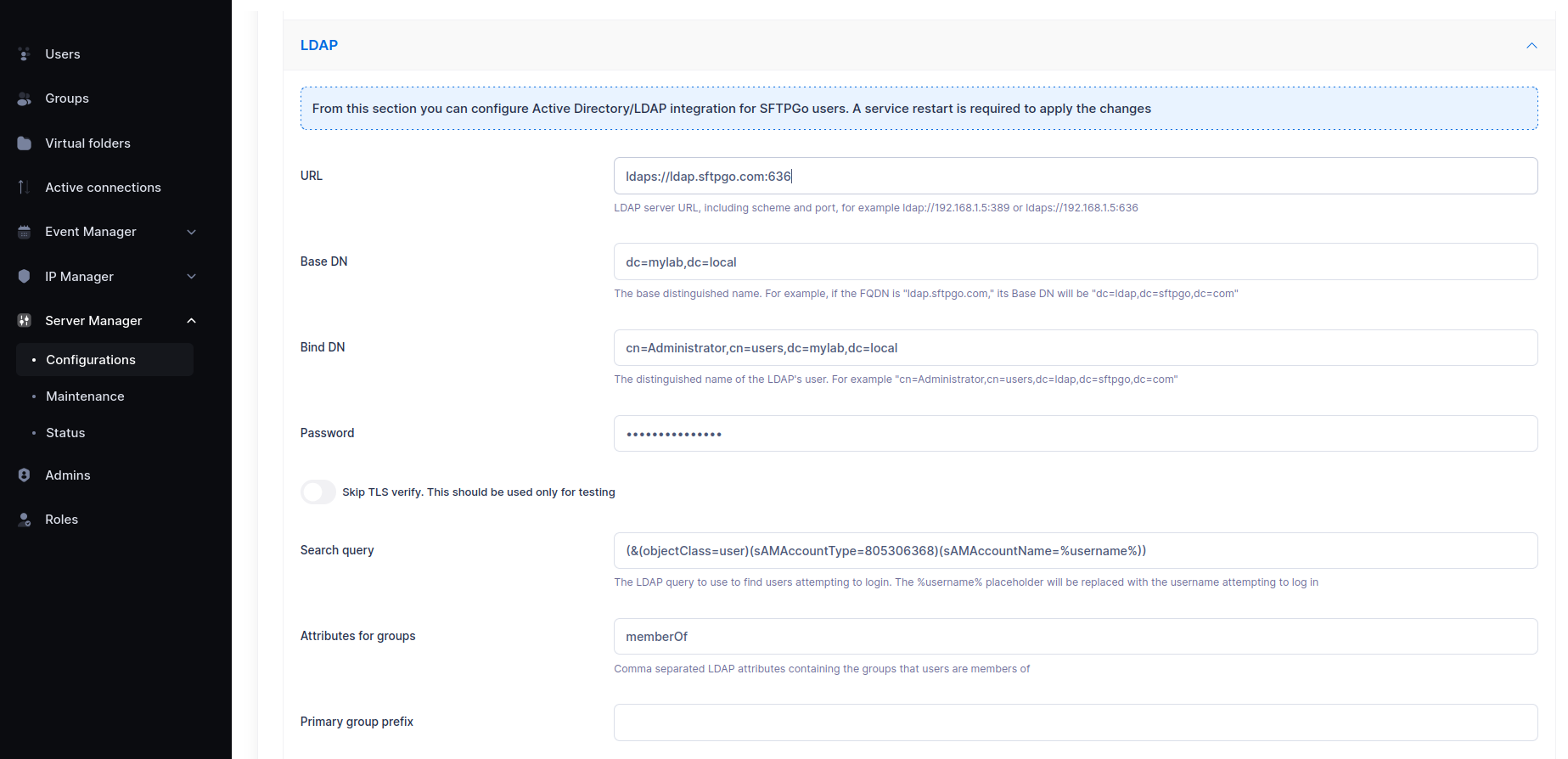
Recommended values for Active Directory:
| Field | Example value |
|---|---|
| URL | ldaps://dc01.example.com:636 (or ldap://dc01.example.com:389 if you also set SFTPGO_PLUGIN_AUTH_STARTTLS=1) |
| Base DN | dc=example,dc=com |
| Bind DN | cn=sftpgo-reader,ou=Service Accounts,dc=example,dc=com |
| Password | the bind account password |
| Search query | leave empty to use the default AD query, or set a custom one (must contain %username%) |
| Group attributes | memberOf |
| Primary / Secondary / Membership / Role group prefix | set as needed — see Group mapping |
For OpenLDAP set the search query to (&(objectClass=posixAccount)(uid=%username%)).
 The form does not cover
 STARTTLS, custom CA certificates, the auto-created users base directory, authentication caching, and multi-directory federation. If you need any of these, switch to the environment variables approach — the two paths are mutually exclusive.
For Active Directory on port 389, using ldaps://dc01.example.com:636 is the simplest way to get a secure connection without STARTTLS, keeping the UI path viable.
Configuration via environment variables
This approach gives full control over every option and is the right choice for multi-directory federation, fully unattended setups, or whenever the form does not expose a setting you need. Do not combine it with SFTPGO_HOOK__ENABLE_LDAP_UI=1: register the plugin yourself through the SFTPGO_PLUGINS__N__* variables shown below.
Basic setup with Active Directory
This example connects SFTPGo to a single Active Directory server.
# LDAP connection
SFTPGO_PLUGIN_AUTH_LDAP_URL="ldap://dc01.example.com:389"
SFTPGO_PLUGIN_AUTH_LDAP_BASE_DN="dc=example,dc=com"
SFTPGO_PLUGIN_AUTH_LDAP_BIND_DN="cn=sftpgo-reader,ou=Service Accounts,dc=example,dc=com"
SFTPGO_PLUGIN_AUTH_LDAP_PASSWORD="your_bind_password"
SFTPGO_PLUGIN_AUTH_STARTTLS=1

# Default home directory for auto-created users
SFTPGO_PLUGIN_AUTH_USERS_BASE_DIR="/srv/sftpgo/data"

# Register the plugin with SFTPGo
SFTPGO_PLUGINS__0__TYPE=auth
SFTPGO_PLUGINS__0__AUTH_OPTIONS__SCOPE=5
SFTPGO_PLUGINS__0__CMD="/usr/bin/sftpgo-plugin-auth"
SFTPGO_PLUGINS__0__ARGS="serve"
SFTPGO_PLUGINS__0__AUTO_MTLS=1
The examples above use plugin index 0. If you have other plugins already configured (e.g., audit logs at indices 0 and 1), adjust the index accordingly. See Plugin indexing for details.
The AUTH_OPTIONS__SCOPE value determines which authentication methods use the plugin:
| Scope | Authentication methods |
|---|---|
| 1 | Password only |
| 4 | Keyboard-interactive only |
| 5 | Password + keyboard-interactive |
The default LDAP search query is optimized for Active Directory:
(&(objectClass=user)(sAMAccountType=805306368)(sAMAccountName=%username%))
This searches for user accounts by their sAMAccountName attribute. The %username% placeholder is replaced with the login username.
For OpenLDAP, set a custom search query:
SFTPGO_PLUGIN_AUTH_LDAP_SEARCH_QUERY="(&(objectClass=posixAccount)(uid=%username%))"
Secure connections
STARTTLS (recommended for AD on port 389):
SFTPGO_PLUGIN_AUTH_STARTTLS=1
LDAPS (port 636):
SFTPGO_PLUGIN_AUTH_LDAP_URL="ldaps://dc01.example.com:636"
Custom CA certificates (for self-signed or internal CA):
SFTPGO_PLUGIN_AUTH_CA_CERTIFICATES="/etc/ssl/certs/internal-ca.pem"
Multiple certificates can be specified as a comma-separated list.
Group mapping
The plugin can map LDAP group memberships to SFTPGo groups. This allows you to manage permissions, virtual folders, and other settings through SFTPGo groups, with membership driven by your LDAP directory.
Groups are read from the LDAP memberOf attribute by default. You can change this:
SFTPGO_PLUGIN_AUTH_LDAP_GROUP_ATTRIBUTES="memberOf"
Mapping with prefixes
LDAP groups are mapped to SFTPGo group types based on configurable name prefixes. For each LDAP group, the plugin extracts the CN (Common Name) from the DN and checks if it starts with one of the configured prefixes.
| Prefix setting | SFTPGo group type | Description |
|---|---|---|
--primary-group-prefix |
Primary | Settings that define the user's base configuration. Only one primary group is assigned. |
--secondary-group-prefix |
Secondary | Additional settings merged on top of the primary group. |
--membership-group-prefix |
Membership | Lightweight group associations (e.g., for share governance). |
Example: Your AD has these groups:
CN=sftpgo-primary-sales,OU=Groups,DC=example,DC=comCN=sftpgo-secondary-readonly,OU=Groups,DC=example,DC=comCN=sftpgo-membership-projectx,OU=Groups,DC=example,DC=com
Configure the prefixes:
SFTPGO_PLUGIN_AUTH_PRIMARY_GROUP_PREFIX="sftpgo-primary-"
SFTPGO_PLUGIN_AUTH_SECONDARY_GROUP_PREFIX="sftpgo-secondary-"
SFTPGO_PLUGIN_AUTH_MEMBERSHIP_GROUP_PREFIX="sftpgo-membership-"
A user who is a member of all three AD groups will be assigned to SFTPGo groups sftpgo-primary-sales (primary), sftpgo-secondary-readonly (secondary), and sftpgo-membership-projectx (membership).
Prefix matching is case-insensitive. The corresponding SFTPGo groups must already exist; the plugin maps users to groups but does not create the groups. The configured prefixes (primary, secondary, membership, role) must be distinct: a prefix matching the initial part of another prefix is rejected, since groups are matched in a fixed order and the overlapping prefix would shadow the others.
Mapping a role
The plugin can also assign an SFTPGo role from LDAP group membership, which is useful for delegated, multi-tenant administration. It reads the same group attribute used for group mapping and matches a dedicated prefix:
SFTPGO_PLUGIN_AUTH_ROLE_GROUP_PREFIX="sftpgo-role-"
A user who is a member of CN=sftpgo-role-bank,OU=Groups,DC=example,DC=com is assigned the SFTPGo role sftpgo-role-bank.
An SFTPGo user can have only one role. Since the role drives tenant isolation, the plugin assigns it only when the membership is unambiguous:
- Exactly one matching role group: the role is assigned.
- No matching role group: the role is left empty (the user is managed by the super administrator).
- More than one matching role group: the login is refused, to avoid an ambiguous cross-tenant assignment.
Prefix matching is case-insensitive and the role name is matched in lower case. The role must already exist in SFTPGo; the plugin assigns the role but does not create it. If the matched role does not exist, the user update fails and the login is rejected even when the credentials are valid. The role prefix must not overlap the group prefixes (no prefix can be a prefix of another), otherwise the configuration is rejected. When this setting is empty the user's role is left untouched.
Requiring group membership
To deny access to users who are not members of any mapped group:
SFTPGO_PLUGIN_AUTH_REQUIRE_GROUPS=true
User requirements
By default (--user-requirements=0), the plugin auto-creates SFTPGo users on first LDAP login. Auto-created users get:
- Home directory under
--users-base-dir(e.g.,/srv/sftpgo/data/username) - Full permissions on
/ - Email address from the LDAP
mailattribute - Password change and reset disabled in WebClient
To require that users already exist in SFTPGo before they can authenticate via LDAP:
SFTPGO_PLUGIN_AUTH_USER_REQUIREMENTS=1
In this mode, the plugin only verifies LDAP credentials. The SFTPGo user must be pre-created (manually or via API), allowing full control over permissions, virtual folders, and quotas.
Caching
To reduce LDAP queries, you can cache successful authentications:
SFTPGO_PLUGIN_AUTH_CACHE_TIME=300
This caches credentials for 300 seconds (5 minutes). During this period, the user can log in without contacting the LDAP server.
Caching is automatically disabled when group or role mapping is configured. This ensures that group membership and role changes in LDAP are always reflected immediately.
High availability with multiple LDAP servers
Multiple URLs (load balancing)
For a single LDAP configuration with multiple servers, provide multiple URLs:
SFTPGO_PLUGIN_AUTH_LDAP_URL="ldap://dc01.example.com:389,ldap://dc02.example.com:389"
The plugin randomly selects from the available servers and automatically removes unresponsive ones. A background health check restores servers when they become available again.
Configuration file (multiple independent directories)
For complex environments with multiple independent LDAP directories (e.g., different base DNs, different credentials), use a JSON configuration file:
SFTPGO_PLUGIN_AUTH_CONFIG_FILE="/etc/sftpgo/ldap-config.json"
When using a configuration file, all other LDAP-related environment variables and flags are ignored.
Example configuration:
{
  "cache_size": 100,
  "configs": [
    {
      "dial_urls": ["ldap://dc01.example.com:389", "ldap://dc02.example.com:389"],
      "base_dn": "dc=example,dc=com",
      "bind_dn": "cn=sftpgo-reader,ou=Service Accounts,dc=example,dc=com",
      "password": "password1",
      "start_tls": 1,
      "search_query": "(&(objectClass=user)(sAMAccountType=805306368)(sAMAccountName=%username%))",
      "group_attributes": ["memberOf"],
      "primary_group_prefix": "sftpgo-primary-",
      "secondary_group_prefix": "sftpgo-secondary-",
      "require_groups": true,
      "base_dir": "/srv/sftpgo/data"
    },
    {
      "dial_urls": ["ldap://ldap.partner.com:636"],
      "base_dn": "dc=partner,dc=com",
      "bind_dn": "cn=reader,dc=partner,dc=com",
      "password": "password2",
      "search_query": "(&(objectClass=posixAccount)(uid=%username%))",
      "base_dir": "/srv/sftpgo/partners"
    }
  ]
}
The cache_size parameter controls the LRU cache that maps usernames to their last successful LDAP server, reducing unnecessary authentication attempts against multiple directories.
The plugin tries the cached server first, then iterates through the remaining configurations until authentication succeeds.
Configuration reference
| Environment variable | Flag | Description |
|---|---|---|
SFTPGO_PLUGIN_AUTH_LDAP_URL |
--ldap-url |
LDAP server URL(s), comma-separated. Supports ldap:// and ldaps:// |
SFTPGO_PLUGIN_AUTH_LDAP_BASE_DN |
--ldap-base-dn |
Base DN for searches (e.g., dc=example,dc=com) |
SFTPGO_PLUGIN_AUTH_LDAP_BIND_DN |
--ldap-bind-dn |
DN of the account used for LDAP searches |
SFTPGO_PLUGIN_AUTH_LDAP_PASSWORD |
--ldap-password |
Password for the bind DN |
SFTPGO_PLUGIN_AUTH_LDAP_SEARCH_QUERY |
--ldap-search-query |
LDAP search filter. Use %username% as placeholder |
SFTPGO_PLUGIN_AUTH_LDAP_GROUP_ATTRIBUTES |
--ldap-group-attributes |
LDAP attributes for group membership (default: memberOf) |
SFTPGO_PLUGIN_AUTH_PRIMARY_GROUP_PREFIX |
--primary-group-prefix |
Prefix for primary group mapping |
SFTPGO_PLUGIN_AUTH_SECONDARY_GROUP_PREFIX |
--secondary-group-prefix |
Prefix for secondary group mapping |
SFTPGO_PLUGIN_AUTH_MEMBERSHIP_GROUP_PREFIX |
--membership-group-prefix |
Prefix for membership group mapping |
SFTPGO_PLUGIN_AUTH_ROLE_GROUP_PREFIX |
--role-group-prefix |
Prefix for role mapping. A user matching more than one role group is refused |
SFTPGO_PLUGIN_AUTH_REQUIRE_GROUPS |
--require-groups |
Deny access if no groups match (default: false) |
SFTPGO_PLUGIN_AUTH_USER_REQUIREMENTS |
--user-requirements |
0 = auto-create users, 1 = users must pre-exist |
SFTPGO_PLUGIN_AUTH_STARTTLS |
--starttls |
Use STARTTLS (1 = enabled) |
SFTPGO_PLUGIN_AUTH_USERS_BASE_DIR |
--users-base-dir |
Base directory for auto-created user home directories |
SFTPGO_PLUGIN_AUTH_CACHE_TIME |
--cache-time |
Cache authentication results for N seconds (0 = disabled) |
SFTPGO_PLUGIN_AUTH_SKIP_TLS_VERIFY |
--skip-tls-verify |
Skip TLS certificate verification (1 = skip). For testing only |
SFTPGO_PLUGIN_AUTH_CA_CERTIFICATES |
--ca-certificates |
Additional CA certificate file paths, comma-separated |
SFTPGO_PLUGIN_AUTH_CONFIG_FILE |
--config-file |
Path to JSON configuration file for multi-directory setups |