Defender
The defender blocks the IP addresses that keep failing to log in or overload the server, on SSH/SFTP, FTP, WebDAV and HTTP (WebAdmin, WebClient and REST API). It is disabled by default: enable it with SFTPGO_COMMON__DEFENDER__ENABLED=true, or enabled in the defender section of the configuration file.
How it works
Each suspicious event, such as a failed login, adds a score to the address that caused it. When the scores collected in the last observation_time minutes reach threshold, the address is banned for ban_time minutes and its connections are refused.
A banned address that keeps connecting stays banned longer: each attempt adds ban_time_increment percent of ban_time, at least one minute. With ban_time set to 30 and ban_time_increment to 50, each attempt adds 15 minutes. On HTTP and WebDAV each request counts as an attempt.
All times are whole minutes: to ban for one day, set ban_time to 1440.
Recommended configuration
A starting point for a server exposed to the internet:
SFTPGO_COMMON__DEFENDER__ENABLED=true
SFTPGO_COMMON__DEFENDER__BAN_TIME=30
SFTPGO_COMMON__DEFENDER__BAN_TIME_INCREMENT=50
SFTPGO_COMMON__DEFENDER__THRESHOLD=8
SFTPGO_COMMON__DEFENDER__OBSERVATION_TIME=15
SFTPGO_COMMON__DEFENDER__SCORE_VALID=1
SFTPGO_COMMON__DEFENDER__SCORE_INVALID=3
SFTPGO_COMMON__DEFENDER__SCORE_NO_AUTH=0
SFTPGO_COMMON__DEFENDER__SCORE_LIMIT_EXCEEDED=3
SFTPGO_COMMON__DEFENDER__MAX_INCOMPLETE_CONNECTIONS=200
With this configuration an address is banned for 30 minutes when, within 15 minutes, it makes:
- 3 login attempts with usernames that do not exist (3 points each);
- 8 login attempts with an existing username and a wrong password (1 point each);
- 200 incomplete connections in a minute, three times (3 points each time).
These values are stricter than the defaults (threshold 15, score_invalid 2, observation_time 30), which ban after 8 attempts with unknown usernames or 15 wrong passwords within 30 minutes. Before enabling the defender behind a proxy or a load balancer, read Behind a proxy or a load balancer.
Events and scores
| Event | Setting | Default |
|---|---|---|
| Failed login with an existing username | score_valid |
1 |
| Failed login with a username that does not exist | score_invalid |
2 |
| SSH or FTP connection closed without a login attempt | score_no_auth |
0 |
A limit exceeded: max_per_host_connections, a per-host rate limiter with generate_defender_events, or max_incomplete_connections |
score_limit_exceeded |
3 |
A score of 0 ignores the event. An SSH login refused because of the algorithms the client uses adds no score, since the refusal is unrelated to the credential: it is logged as Algorithm negotiation failed.
Behind a proxy or a load balancer
The defender bans the address SFTPGo sees. Behind a proxy or a load balancer that address is the proxy's, so a ban would block every client: configure SFTPGo to read the address of the client.
- SSH and FTP: enable the PROXY protocol on the load balancer and on SFTPGo, with
proxy_protocolandproxy_allowed. - HTTP and WebDAV: set
client_ip_proxy_headerandproxy_allowedon the binding, see Reverse proxies and load balancers.
Preventing and lifting bans
Addresses you trust, such as monitoring systems or the address of an office network where many users share one IP, can be exempted in advance from the IP Manager section of the WebAdmin:
- the Trusted List exempts an address from the defender, the rate limiters and the IP filtering plugins;
- an
Allowentry in the Defender List always permits an address, and aDenyentry always blocks it.
The Auto Block List shows the banned addresses and when their ban expires. Click the X icon on a row to lift a ban.
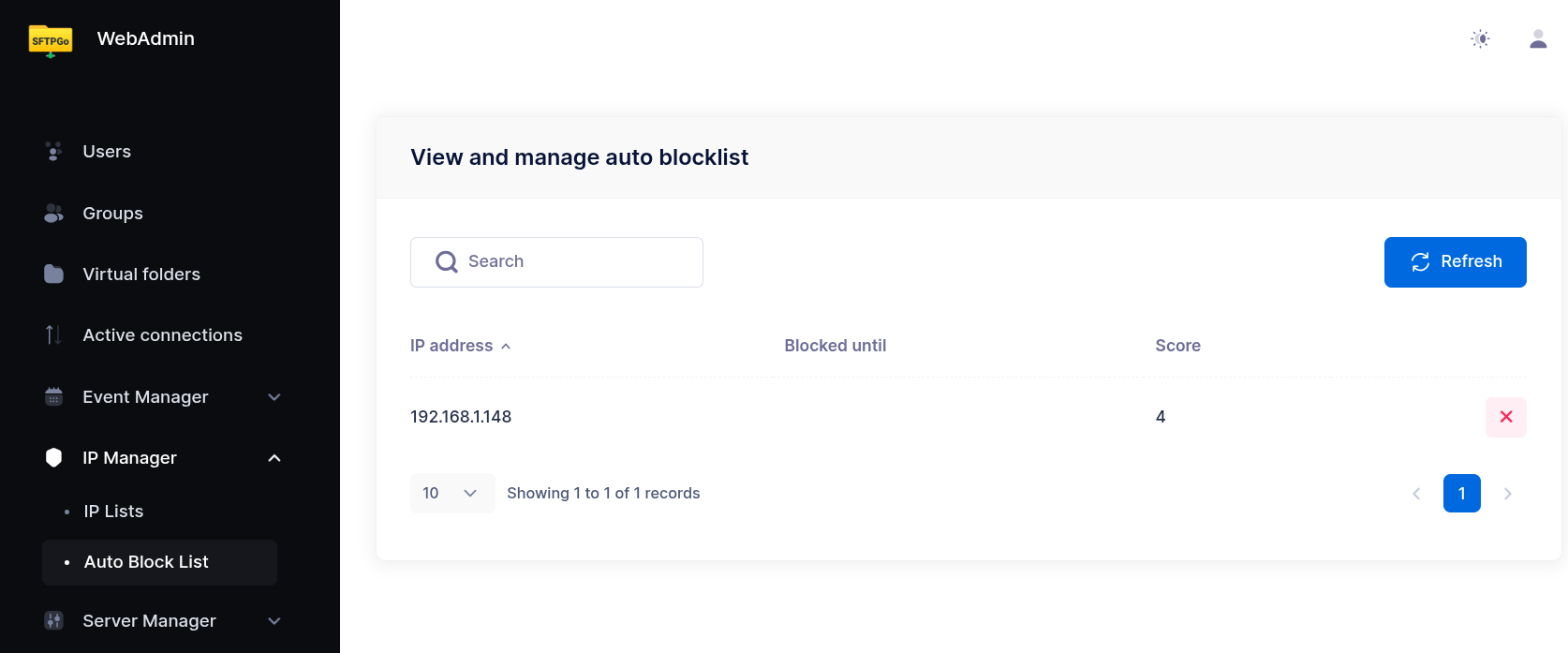
The same operations are available through the REST API, see /defender/hosts and /ip-lists in the REST API reference. To be notified of each ban, create an Event Manager rule with the IP blocked trigger.
Incomplete connections
A common attack opens many connections and closes them before logging in, to load the server with the work of setting up each one, such as the TLS handshake or the SSH key exchange. Set max_incomplete_connections above 0 to ban the addresses that do this. It is disabled by default.
A connection is incomplete when it is closed:
- on SSH, FTP and FTPS, without a login attempt; on FTP a connection that sends only the username counts too;
- on HTTPS and WebDAV over TLS, before the TLS handshake completes.
Each minute in which an address reaches max_incomplete_connections incomplete connections adds score_limit_exceeded to its score, and the address is banned when its score reaches the threshold. Addresses in the Trusted List or the Rate Limiters Safe List, or with an Allow entry in the Defender List, are never banned.
With the setting enabled, the connections of a banned address are closed as soon as they arrive, before any setup work, on every protocol. An unban from the WebAdmin takes effect within a minute.
On HTTP and WebDAV the setting also limits each address to 1000 open connections per service, idle connections included. Many browsers behind a single address, such as a corporate network, can need more: raise the limit with SFTPGO_HOOK__DEFENDER_MAX_OPEN_CONNECTIONS_PER_HOST.
Keep in mind:
- On HTTP and WebDAV bindings behind a reverse proxy (
proxy_modeset to1orclient_ip_proxy_headerset), every connection arrives from the proxy address, so the defender cannot refuse it on arrival: it checks each request instead, using the client address sent by the proxy. SSH and FTP behind a load balancer are covered as well, through the PROXY protocol. - Each instance counts the connections it receives: behind a load balancer, an address spread across several instances needs more connections to be banned. With the
providerdriver the ban applies to every instance.
Clients that are not attacking close a few tens of connections a minute at most before logging in: start with 200 and lower it if needed.
Login delay
The defender can pause before answering a login, to slow down password guessing:
login_delay.password_failed: milliseconds to wait before reporting a failed password or keyboard-interactive login. Default1000.login_delay.success: milliseconds to wait before completing a successful login. Default0. A delay here hides from the response time whether a login succeeded.
0 disables the pause.
Storage
The driver setting selects where scores and bans are kept:
memory (default) |
provider |
|
|---|---|---|
| After a restart | bans and scores start empty | bans and scores are kept |
| Several instances | each instance has its own bans | instances share bans, with MySQL, PostgreSQL or CockroachDB |
| Cost | none | a database query for each new connection |
The provider driver supports SQLite, MySQL, PostgreSQL and CockroachDB: choose SQLite to keep bans across restarts on a single instance. It removes expired bans and scores periodically.
Memory limits
The memory driver keeps two lists, the banned addresses and the addresses with a score, each with up to entries_hard_limit entries. When a list grows beyond it, it is trimmed to entries_soft_limit entries, keeping the bans that expire last and the scores with the most recent events. The defaults, 100 and 150, fit a small installation. A server exposed to the internet can receive attacks from thousands of addresses: raise both limits, for example to 10000 and 15000, so that every ban lasts its full ban_time.
With the provider driver, entries_hard_limit sets how many entries the WebAdmin and the REST API list.