What is SFTPGo?
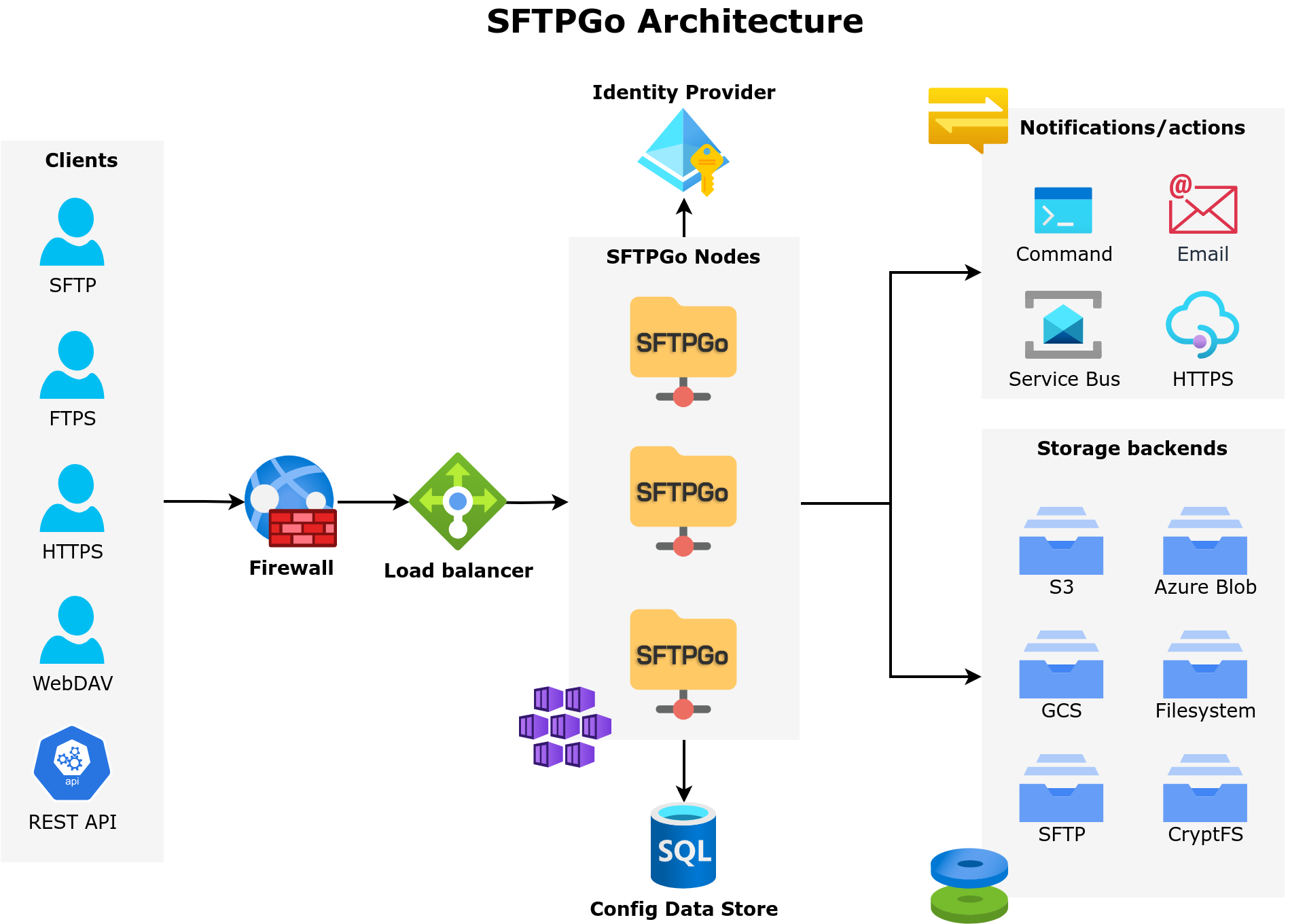
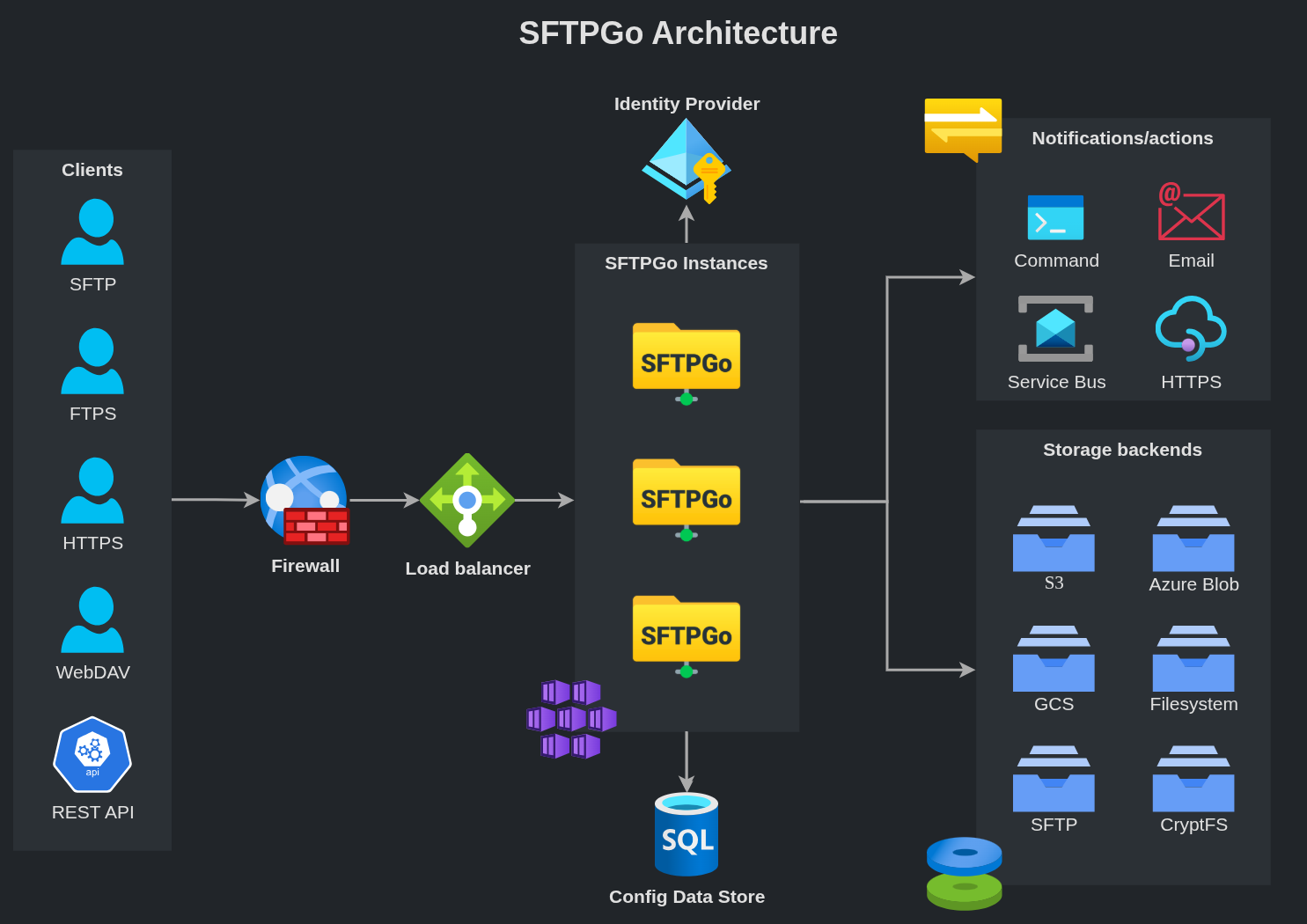
SFTPGo is an open-core managed file transfer (MFT) platform. It moves files securely over SFTP, SCP, FTP/S, WebDAV, or its own HTTPS WebClient, and can store them locally or in the cloud.
SFTPGo is built around a few core principles:
- Protocol-agnostic access. Users can connect via SFTP, SCP, FTP/S, WebDAV, or the built-in web interface — the same files and permissions apply across all protocols.
- Storage abstraction. Local filesystem, encrypted filesystem, S3-compatible storage, Google Cloud Storage, Azure Blob, and remote SFTP/FTP servers are all supported as storage backends, including within the same installation.
- Event-driven automation. The Event Manager allows administrators to define rules that react to file operations, provider changes, or schedules — enabling automated workflows such as notifications, cross-backend file transfers, antivirus scanning, data retention, PGP encryption, and more.
- Security and compliance. Data-at-rest encryption, audit logging, brute-force protection, geo-IP filtering, post-quantum cryptography for SSH and HTTPS, and fine-grained access controls help meet regulatory requirements. Authentication supports passwords, public keys, certificates, multi-factor, LDAP/Active Directory, and OpenID Connect (SSO).
SFTPGo is designed for high availability: it supports multi-node clustering with near real-time configuration propagation, runs natively on Kubernetes (with an official Helm chart), and is available on the AWS, Azure, and Google Cloud marketplaces. A Terraform provider is available for Infrastructure as Code workflows.
The WebAdmin interface provides centralized management for users, groups, virtual folders, event rules, and server configuration. The WebClient gives end users a browser-based file manager with credential management, two-factor authentication, and secure file sharing.
Start with the installation guide, then follow Getting Started to set up your first users and storage. For an overview of what SFTPGo can do, see Features.
If you work with an AI assistant, install the official SFTPGo skill: the same skill works with Claude Code, Cursor, Copilot, ChatGPT, Gemini and other assistants, and gives them the context to write correct SFTPGo configurations, REST API payloads and Event Action templates.
Open Source and Enterprise editions
SFTPGo is available in two editions:
- The Open Source edition is released under the AGPLv3 license. It includes the full protocol stack, storage backends, WebAdmin and WebClient interfaces, basic Event Manager automation, OpenID Connect support, and the REST API. Documentation for the Open Source edition is available here.
- The Enterprise edition is offered under a proprietary license that removes the AGPLv3 restrictions. It includes commercial support and additional features.
This documentation covers the Enterprise edition.
What Enterprise adds
| Area | Enterprise additions |
|---|---|
| Event Manager | Full template engine with helper functions, conditions, and loops. Virtual folder integration for cross-backend operations. Additional actions: ICAP (antivirus/DLP), IMAP (email ingestion), event reports, PGP encryption/decryption. Execute Before File Publish for staged upload processing. Enhanced copy action with source disposition, glob patterns, and retries. Data retention with archival. |
| OpenID Connect | Configurable role mapping, PKCE without client secret, session control (max_age, prompt), Azure B2C compatibility, customizable login labels. |
| WebClient | WOPI document editing and real-time collaboration. TUS resumable uploads for reliability through proxies/CDNs. |
| Sharing | Email-based authentication. Group-based delegation and governance policies. Path and scope restrictions. |
| Storage | Optimized cloud backend performance (up to 70% faster for small files). In-memory transfers (no local temp storage). GCS Hierarchical Namespace. SFTP backend SOCKS proxy. FTP as storage backend. |
| Administration | Clustering with near real-time propagation. Extended WebAdmin configuration: OIDC, LDAP, Geo-IP, TLS certificates, email templates, SSH host keys — all from the UI. API key management from the UI. |
Both editions are actively maintained. The Open Source edition receives regular bug fixes and improvements. New features are developed primarily for the Enterprise edition and may be backported to the Open Source edition over time.
Copyright
Copyright (C) 2019 - 2026 Nicola Murino